WSU Restricted information is the category of data that contains some of the most sensitive personal information at WSU. It is highly sensitive information, maintained, collected or recorded by WSU that is intended for limited, specific use by a workgroup, department, group of individuals or third party with a legitimate need to use or access the data. The difference between Private and Restricted data is that explicit authorization by the designated data owner is required for access to WSU Restricted data due to legal, contractual, privacy or other related constraints.

Examples of Restricted data include sensitive personal identifiable information, such as social security or driver’s license numbers, credit card numbers, identifiable genetic or biometric information, medical information, and Federal Tax Information. See the WSU policy 19.20 / Data Sensitivity Classification for more examples and specific information about all of the types of WSU Restricted data.

Privacy for individuals must be at the forefront of our mind when handling WSU Restricted information, as unauthorized release of this information often times could be harmful to an individual if it is mismanaged. Applying the appropriate labels and following the privacy principles listed on the WSU Privacy SharePoint Site can guide you in proper management. Check in tomorrow for tips on how you can label this Restricted information to ensure the appropriate management of it. For more information about data labeling and how to apply labels, visit the Data Labeling Guide on the Information Security website.


A round information security logo with wheat shocks in the middle

The Information Security Department will launch a new Information Security Training next week replacing the current IT Security Awareness (ITSA) course in the Employee Required Training section of the myWSU portal.

In about 30 minutes, you will gain the essential knowledge to help protect WSU data and maintain compliance with regulatory requirements. Watch for an email in your WSU inbox next week to access the training. Instructions have been compiled to help you navigate the system.

WSU Private data is information that has a low to moderate sensitivity and is intended for internal university business use only, with access restricted to a specific workgroup, department, group of individuals or affiliates with the legitimate need to use or access the information. A few examples include myWSU ID’s, information technology transaction logs and non-directory information or student records that are protected under FERPA. See WSU policy 19.20 / Data Sensitivity Classification for more specific information about WSU Private data.

WSU Private data is information that still warrants careful handling through use of privacy principles such as data minimization, storage limitations and purposeful use. Finding out what these principles are and how you can apply them is easy, just visit the Privacy SharePoint Site. Using these guiding privacy principles can help to protect the privacy of the students and other members of the WSU community we serve. Check back tomorrow for information on what is considered Restricted data at WSU. For more information about data labeling and how to apply labels, visit the Data Labeling Guide on the Information Security website.

Public information doesn’t usually require privacy protections, but it still must remain accurate and maintain its integrity — both key privacy principles. Let’s take a closer look at the WSU Public label and the types of information it includes.

WSU Public data generally has a low sensitivity but still warrants protection in order to maintain the accuracy and integrity of the data. This type of data is explicitly or implicitly approved for distribution to the public without restriction. A few examples include information that is provided on the university’s public website, semester course schedules or information that has been approved for release by the Registrar’s Office. See WSU policy 19.20 / Data Sensitivity Classification for more specific information about WSU Public data.

Inaccurate personal information about an individual can still be harmful to them or to the organization. Check back tomorrow to learn about WSU Private data and how it differs from public data. For more information about data labeling and how to apply labels, visit the Data Labeling Guide on the Information Security website.
Blue background with the words data privacy week on it. It also has a black padlock with a white fingerprint on it.

Did you ever wonder what your role is in protecting the privacy of individuals whose personal information you manage? A great way to start is by understanding the data sensitivity classifications and labeling the personal information contained in documents and emails in our WSU system. To increase your knowledge in this area and in honor of Data Privacy week, learn more about data labeling.

WSU has four different categories of labels for data. They are WSU Public, WSU Private, WSU Restricted and WSU Proprietary. Check back each day this week to learn more about how to select and apply these labels. For more information about data labeling and how to apply labels, visit the Data Labeling Guide on the Information Security website.

A round information security logo with wheat shocks in the middle

The Information Security Department will launch a new Information Security Training next spring, replacing the current IT Security Awareness (ITSA) course in the Employee Required Training section of the myWSU portal.

In about 30 minutes you will gain the essential knowledge to help protect WSU data and maintain compliance with regulatory requirements. Watch for upcoming emails in your WSU inbox with details on how to access the training. Thank you for doing your part to keep WSU data secure.

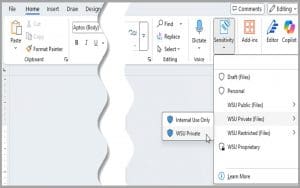
A picture of a document with the data sensitivity labels showing on the right side. The labels included are: Draft, Personal, WSU Public, WSU Private, WSU Restricted, and WSU Proprietary. An arrow is highlighting the WSU Private line and another box with the labels "Internal Use Only" and "WSU Private" is selected."

Data sensitivity labeling is now available to all members of Wichita State and is a powerful solution that will enhance managing and protecting sensitive information.

Benefits include:

  • Improved data security
  • Enhanced compliance
  • Streamlined data management
  • Advanced document control and sensitive data management
  • And more

Using the new labels:

Labels can be applied to your Office documents and email communications using built-in Microsoft tools. In Office and O365 applications, select the appropriate label from the new sensitivity icon and select the desired label.

A full guide on labeling can be found on the Information Security & Privacy website.

Faculty and staff are encouraged to take advantage of the new feature and integrate data sensitivity labeling into their daily workflows for a more secure and compliant work environment.

This is a large pile of gold papers stacked hapharzardly in a dark, dank basement with concrete walls and floors.

The privacy practices of data minimization and storage limitation need to be considered when storing sensitive personally identifiable information (PII). Storage should adhere to documented retention timelines developed after careful consideration by all data stakeholders. For highly sensitive information, such as Social Security numbers, financial details or driver’s license numbers, maintaining a single source of truth is considered best practice. Minimizing duplication and avoiding storage in multiple locations whenever possible reduces risk and strengthens data security.

WSU Policy 19.01 / Acceptable Use provides clear guidelines and outlines specific restrictions regarding the storage of sensitive information, including Social Security numbers and credit card data, to ensure compliance and safeguard this critical information.

Think about your OneDrive or email folders: What types of sensitive information do you have stored in there? Are there any files that contain sensitive PII that you no longer need and can be deleted? This is unfortunately a common place where we find sensitive PII stored unnecessarily “just in case.” Clearing out this information from OneDrive or emails is an easy step towards reducing the risk of having that sensitive information compromised.

For more information visit the WSU Privacy SharePoint Site. For any privacy related questions or concerns, reach out to the privacy officer at privacy@wichita.edu or via phone at 316-978-4447 (4HIP).

This is a tall stack of papers organized haphazardly.

As discussed yesterday, collection of and access to sensitive personally identifiable information (PII) needs to occur based upon a legitimate purpose. Minimizing the amount and type of PII collected and reducing the number of places it is stored is best practice. Once the PII has been collected and used for its intended purpose, it’s important to evaluate how long it needs to be retained. Both regulatory requirements and business reporting and system functions will drive the length required for retention.

Have you ever fallen into the trap of saving extra copies of information due to fear of losing the original? Do you tend to save copies of student grades or gradebooks outside of Banner or Blackboard “just in case”? No sensitive PII should ever be kept “just in case.” Retention guidelines should be implemented into policies and procedures, and individuals responsible for following through on them should be identified. Caution should always be exercised before deleting information from large data ecosystems that have multiple stakeholders or connect across multiple systems. Impact of deletion should be fully vetted, understood and agreed upon by data system owners and stewards.

For more information visit the WSU Privacy SharePoint Site. For any privacy related questions or concerns, please reach out to the privacy officer at privacy@wichita.edu or via phone at 316-978-4447 (4HIP).

This is a picture of brown file folders with wite papers in it. The main folder is labeled informaiton. The rest of the folder labels are blurry.

Sensitive personally identifiable information (PII) is typically information that individuals would consider private or that could cause harm to them if unauthorized access and use occurred. The problem is that most of the technological world relies on personal information to provide a service to customers. This information is usually protected by certain regulatory or legal requirements which necessitates a certain level of data security practices to be implemented to maintain the confidentiality, integrity and availability of the data.

The volume and type of sensitive data you manage is directly linked to the costs associated with protecting it. Implementing legal and regulatory requirements for such data significantly contributes to these expenses. Additionally, holding large amounts of sensitive PII across multiple locations increases the risk of becoming a target for malicious actors who seek to monetize sensitive data for illegal purposes.

To address these challenges, it is crucial to collect or access sensitive data only when there is a legitimate purpose and to minimize its use and storage wherever possible. WSU Policy 19.01 / Acceptable Use outlines specific restrictions on storing sensitive information, such as Social Security numbers or credit card data, to help mitigate these risks. Take a look at your OneDrive or through email. What kinds of sensitive PII are being collected in there that no longer need to be?

For more information visit the WSU Privacy SharePoint Site. For any privacy related questions or concerns, reach out to the privacy officer at privacy@wichita.edu or via phone at 316-978-4447 (4HIP).